Media Library
Important
The English version of this Visual CMS documentation serves only as a basis and for developers and does not contain all details. More comprehensive documentation can be found in the German documentation.
The Media Library is part of the Content & Media Bundle and is included in all editions (CE, PE, EE). It provides a central storage for media assets used by the WYSIWYG Editor and Visual CMS widgets.
Media IDs
Every file uploaded to the Media Library is assigned a media ID that remains stable across renames and folder moves. Shop content (CMS pages, product descriptions, Visual CMS widgets) references media by ID rather than by path, so moving or renaming a file does not break references.
The media ID is shown in the file’s detail panel in the admin UI and can also be looked up via the search field — which matches both file name and media ID.
For migrating existing content from path-based to ID-based references, see Introduction of Media IDs in the Update guide.
Module Configuration
Module settings are reachable in the admin area via .
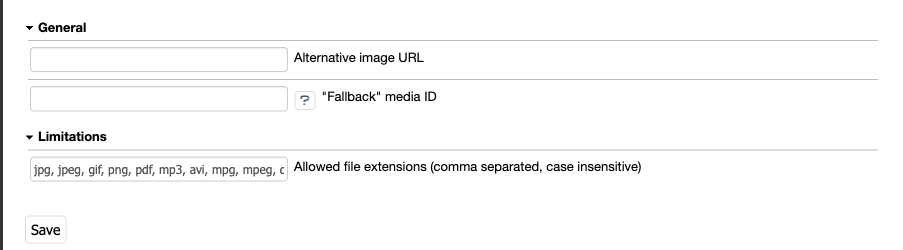
Settings relevant to deployment and integration:
Alternative Image URL (CDN)
If an external URL is configured, the module resolves media files from that URL instead of the local media directory. This is intended for CDN setups. Only external URLs are accepted — local paths are rejected.
Files are still uploaded to the local media directory, which can be synchronised to the external storage separately. Thumbnails in the admin Media Library are generated from the remote image source, which also allows modules to customise the upload mechanism (for example, pushing uploaded files directly to the CDN).
Default Media ID (Fallback)
A media ID can be configured as a fallback image. The file referenced by this ID is rendered whenever a requested media reference cannot be resolved — for example when the original media file is missing, or was deleted or moved after it had been placed in content. Instead of raising an error over the missing media, the shop displays this fallback image, so content with missing media still renders cleanly. A clearly identifiable placeholder — such as a “no-pic” image — makes missing media easy to spot in production.
Allowed File Extensions
The module configuration specifies which file extensions can be uploaded, comma-separated and case-insensitive. The extension whitelist is one of several checks — see Upload Validation below for the full picture.
Upload size is bound by server and PHP configuration, not by the module:
post_max_size(php.ini) — if too small, the uploaded file appears with namenulland sizeNaN b.upload_max_filesize(php.ini) — if exceeded, the uploaded file shows size0kb.
Upload Validation
Uploaded files pass through UploadedFileValidatorChainInterface, which iterates a tagged set of validators in this order:
FileNameValidator— rejects empty names, names starting with., names containing/or\, names containing.., and names containing null bytes.FileUploadStatusValidator— rejects files that did not arrive completely.FileExtensionValidator— enforces the Allowed File Extensions whitelist.MimeTypeValidator— the sniffed content type must match the MIME types registered for the declared extension. The mapping is provided byFileFormatRegistryInterface. Files whose extension is unknown to the registry skip this check.ContentValidatorChain— dispatches to per-formatContentValidatorInterfaceservices. Currently built in:SVG — rejects
<script>elements,<foreignObject>elements, attributes whose name starts withon(such asonclick,onload), andhrefattributes with the URL schemesjavascript:ordata:.Raster images (jpg, jpeg, gif, png, webp, avif) — the file must parse via
getimagesize().
Extending the chain
Register a new file format. Register an additional
FileFormatInterface(extension + accepted MIME types) withFileFormatRegistryInterfacevia service configuration.MimeTypeValidatorandContentValidatorChainconsult the registry, so new formats inherit the same protection.Add a content check for a format. Implement
ContentValidatorInterfaceand tag the service withoxid_esales.media_library.validation.content_validator.ContentValidatorChaincalls every validator whosesupports($format)returnstrue.Add a top-level chain validator. Implement
FilePathValidatorInterfaceand tag the service withoxid_esales.media_library.validation.chain_validator. The validator runs in addition to the built-in ones.Replace the chain entirely. When overriding
UploadedFileValidatorChainInterfacewith a fully custom implementation, include bothMimeTypeValidatorandContentValidatorChain(afterFileExtensionValidator) to retain the upload-content protection.
FilePathInterface gained a new method getExtension(): string returning the lowercased file extension. Modules implementing this interface themselves must add it; the registry-based validators rely on it.
Recommended File Formats
Images: AVIF, GIF, JPEG, PNG, SVG, WebP
Documents: PDF, ZIP